
How to Read a Pay Stub: Every Line Item Decoded for First-Timers
Your offer letter said $60,000. Your first paycheck says $1,654.
That gap is not a mistake. But if nobody has ever walked you through a pay stub before, it can feel like one.
For millions of Americans — new graduates, immigrants, career changers, and first-time wage earners — that first paycheck creates real anxiety. According to payroll data compiled for this guide, a $60,000 annual salary in a typical US state yields roughly $35,000–$38,000 in take-home pay after federal taxes, state taxes, Social Security, Medicare, and benefit deductions. The difference isn’t hidden. It’s printed right there on your stub — in a language most people were never taught to read.
This guide changes that. You’ll learn what every section, line, and abbreviation on your pay stub means — including the OBBBA “No Tax on Overtime” deduction — a temporary federal tax break (2025–2028) that’s still creating widespread confusion. By the end, you’ll be able to verify your own pay, spot errors before they cost you money, and make smarter financial decisions using data you already have.
Whether this is your first US paycheck or your hundredth, this is the guide you deserved on day one.
Disclaimer: This article is for educational purposes only and does not constitute tax, legal, or financial advice. Consult a licensed CPA or tax professional for personalized guidance.
What Is a Pay Stub?
A pay stub (also called a paycheck stub, payslip, wage statement, or earnings statement) is the detailed financial document that comes with every paycheck. It shows three things:
- What you earned (gross pay) for the pay period
- What was taken out (taxes and deductions)
- What you received (net pay, or take-home amount)
You get one every pay period — whether that’s weekly, bi-weekly, semi-monthly, or monthly. Most employers issue them digitally through an HR portal today, though paper stubs still exist.
Are employers required to give you a pay stub? Federal law does not mandate it, but most states do. If your employer provides no pay stub or refuses to share one, contact your state’s Department of Labor.
Pay Frequency Types
How often you’re paid affects how much each check shows — even if your annual salary is identical.
| Frequency | Paychecks/Year | $50K Annual = Per Check | Most Common For |
|---|---|---|---|
| Weekly | 52 | ~$961.54 | Hourly / trades / construction |
| Bi-Weekly | 26 | ~$1,923.08 | US private sector (most common) |
| Semi-Monthly | 24 | ~$2,083.33 | Salaried corporate employees |
| Monthly | 12 | ~$4,166.67 | Executive / contract roles |
Why US Pay Stubs Are So Complex
If you grew up outside the United States, your first US pay stub can be a genuine shock.
In many countries, payroll is straightforward — your employer deducts a flat income tax, and your take-home is close to what you expected. The US system is different. It layers multiple mandatory federal taxes on top of each other, adds state and local taxes that vary by location, and then subtracts voluntary benefit elections you may have made during onboarding.
The result? A document with 8+ distinct sections, 50+ possible abbreviations, and a net pay that can be $800 or more below your gross earnings — every single paycheck.
That complexity is not a flaw. Each deduction has a reason. Once you understand the system, you can actually use it to your advantage — reducing your tax bill with smart pre-tax elections, capturing free employer match money, and avoiding payroll errors that affect one in four workers.
The 8 Sections of a Pay Stub
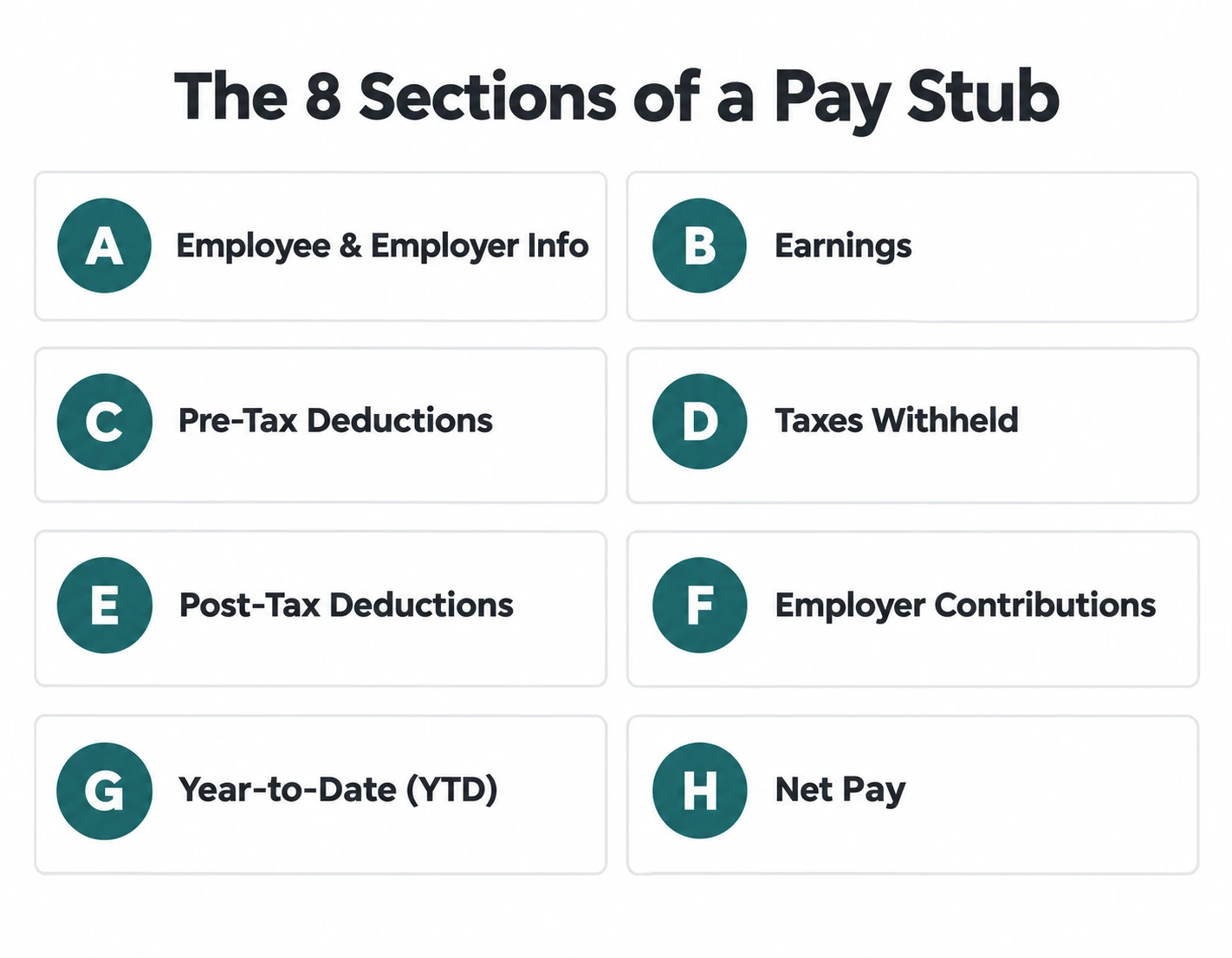
Most US pay stubs follow this structure. Not every employer shows every section, but these are the standard zones.
Section A — Employee & Employer Information
The top of your stub. Contains:
- Your full legal name and address
- Your employer’s name, address, and EIN (Employer Identification Number)
- Your employee ID or social security number (usually masked)
- Pay period start and end dates
- Pay date (the date money hits your account)
- Check or direct deposit confirmation number
Check this every pay period. Studies show that 23% of all payroll errors trace back to incorrect personal information — wrong address, misspelled name, or incorrect SSN. These errors can delay W-2s, complicate tax filing, and flag your account for garnishments.
Section B — Earnings
This section lists everything you earned, broken out by type. Each line shows:
- Type of pay (REG, OT, HOL, BONUS, etc.)
- Hours worked (for hourly employees)
- Rate of pay
- Amount for the current period
Common earnings types:
| Code | Meaning | Rate |
|---|---|---|
| REG | Regular hours | Your base rate |
| OT | Overtime (over 40 hrs/week) | 1.5x base rate (FLSA required for non-exempt) |
| DT | Double time | 2x base rate |
| HOL | Holiday pay | Varies by employer policy |
| BONUS | One-time bonus payment | Full amount |
| VAC / PTO | Paid time off used | Base rate |
| SHIFT | Shift differential | Extra amount per hour for off-hours shifts |
Hourly example: 40 regular hours at $25/hr + 5 overtime hours at $37.50/hr = $1,000 + $187.50 = $1,187.50 gross.
Salaried example: $60,000 annual salary, bi-weekly pay = $60,000 ÷ 26 = $2,307.69 per period.
Section C — Pre-Tax Deductions
These are amounts removed from your gross pay before taxes are calculated. They reduce your taxable income — which means a lower tax bill.
Common pre-tax deductions:
- 401(k) / 403(b) / 457 — retirement contributions
- HSA — Health Savings Account
- FSA / DCFSA — Flexible Spending Accounts
- Health, dental, vision insurance premiums — employer-sponsored benefits
- Commuter benefits — transit passes, parking
We cover these in detail in the Pre-Tax vs Post-Tax section.
Section D — Taxes Withheld
The largest deduction section for most people. Contains:
- FIT / FED — Federal Income Tax
- SS / OASDI — Social Security (6.2% up to $184,500)
- MED — Medicare (1.45%)
- SIT — State Income Tax (if your state has one)
- LT / LOCAL — Local or city tax (where applicable)
Section E — Post-Tax Deductions
These come out after taxes are calculated. They do not reduce your taxable income.
Common post-tax deductions:
- Roth 401(k) — same retirement vehicle, but contributions are taxed now, withdrawals tax-free later
- Supplemental life insurance — employer coverage above the standard $50K threshold
- LTD / STD — disability insurance (post-tax treatment preserves tax-free benefits later)
- GARN / LEVY / CHILD SUPPORT — wage garnishments (court-ordered)
- UNION — union dues
Section F — Employer Contributions
This section confuses a lot of employees. It shows what your employer is paying on your behalf — money that never touches your paycheck but is part of your total compensation.
Common entries:
- Employer 401(k) match — free retirement money added to your account
- Employer health premium share — typically 70–80% of your health insurance cost
- Employer FICA match — your employer pays an equal 6.2% SS + 1.45% Medicare for every dollar you earn (not shown on your stub, but it’s real)
A worker earning $60,000 might cost their employer $72,000–$75,000 when you factor in all employer-paid benefits and taxes.
Section G — Year-to-Date (YTD)
A cumulative running total of every column in sections B through E, from January 1 through the current pay date. This column is one of the most useful — and most ignored — parts of your stub. See the YTD Guide section for how to actually use it.
Section H — Net Pay
The bottom line. The amount that hits your bank account.
Formula: Net Pay = Gross Pay − Pre-Tax Deductions − All Taxes − Post-Tax Deductions + Reimbursements
Your stub will also show the payment method — usually direct deposit with a masked account number (e.g., ****4521). Verify this matches your bank account when you start a new job.
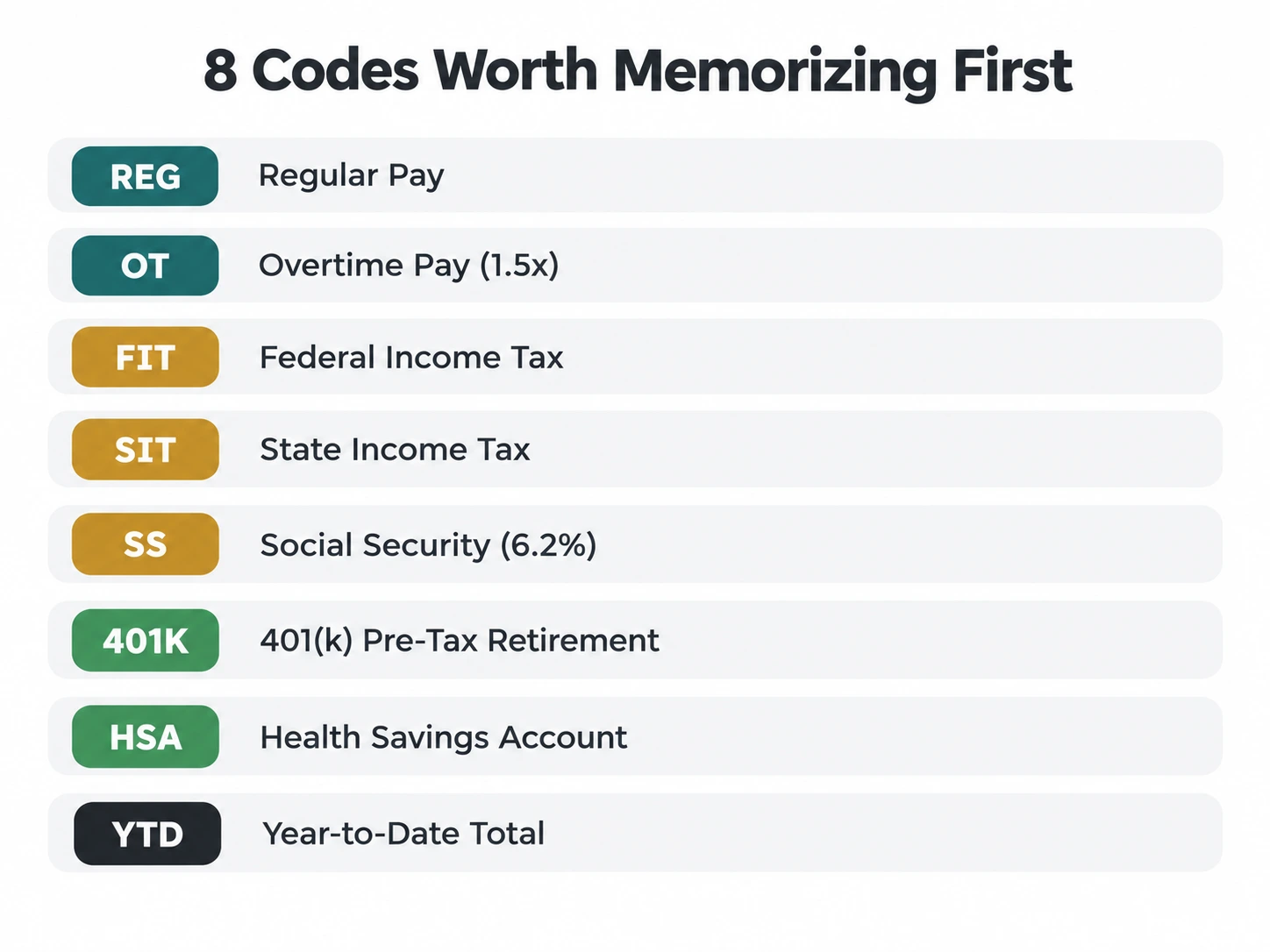
Complete Abbreviation Cheat Sheet
Pay stubs use dozens of codes. Here’s the complete reference.
Earnings Codes
| Code | Meaning | Code | Meaning |
|---|---|---|---|
| REG | Regular Pay | OT | Overtime Pay (1.5x) |
| SAL | Salary | DT | Double Time (2x) |
| HOL | Holiday Pay | BONUS | Bonus Payment |
| COMM | Commission | TIP | Reported Tips |
| VAC | Vacation Pay | SICK | Sick Pay |
| PTO | Paid Time Off | REIMB | Expense Reimbursement |
| RETRO | Retroactive / Back Pay | SHIFT | Shift Differential |
Tax Codes
| Code | Meaning | Code | Meaning |
|---|---|---|---|
| FIT / FED | Federal Income Tax | FITW / FWT | Federal Income Tax Withholding |
| SIT / SWT | State Income Tax | LT / LOCAL | Local / City Tax |
| SS / OASDI | Social Security (6.2%) | MED | Medicare Tax (1.45%) |
| FICA | Combined SS + Medicare | ADDL MED | Additional Medicare (0.9% over $200K) |
| FUTA | Federal Unemployment (employer only) | SUTA | State Unemployment (employer only) |
Deduction & Benefit Codes
| Code | Meaning | Code | Meaning |
|---|---|---|---|
| 401K | 401(k) Pre-Tax Retirement | ROTH | Roth 401(k) Post-Tax |
| HSA | Health Savings Account | FSA | Flexible Spending Account |
| DCFSA | Dependent Care FSA | MED / HLT | Health Insurance Premium |
| DEN | Dental Insurance | VIS | Vision Insurance |
| GTL | Group Term Life Insurance | LTD | Long-Term Disability |
| STD | Short-Term Disability | GARN | Wage Garnishment |
| LEVY | Tax Levy (IRS or State) | UNION | Union Dues |
| EE | Employee (contribution) | ER | Employer (contribution) |
| YTD | Year-to-Date Total | TT (Box 12) | Qualified Overtime Compensation — new box starting with 2026 W-2s |
Pre-Tax vs Post-Tax Deductions
This is one of the most important concepts on your stub — and one of the least explained.
Pre-tax deductions reduce your gross income before taxes are calculated. That means you pay taxes on a smaller number, which lowers your tax bill. These deductions are not money “lost.” They’re money sheltered.
Post-tax deductions come out after taxes. They don’t reduce your taxable income. The trade-off is that the benefit on the other end is often tax-free (like Roth 401(k) withdrawals in retirement).
Pre-Tax vs Post-Tax Comparison
| Deduction Type | Pre-Tax | Post-Tax |
|---|---|---|
| Traditional 401(k) | Yes | No |
| Roth 401(k) | No | Yes |
| HSA contributions | Yes | No |
| FSA contributions | Yes | No |
| Health insurance premiums (employer plan) | Yes | No |
| Supplemental life insurance (above $50K) | No | Yes |
| Long-term disability (employer plan) | Varies | Common |
| Wage garnishments | No | Yes |
The Tax Savings Example
Say you earn $60,000/year and contribute $5,000 to a pre-tax HSA.
- Without HSA: taxes calculated on $60,000
- With HSA: taxes calculated on $55,000
At a 22% effective rate, that’s roughly $1,100 saved in taxes per year — just from one pre-tax election.
The HSA Triple Advantage: HSA contributions are pre-tax in (reduces taxable income), tax-free during growth (investments in the account), and tax-free when withdrawn for qualified medical expenses. No other savings vehicle matches this.
2026 Contribution Limits
| Account | 2026 Limit | Notes |
|---|---|---|
| 401(k) / 403(b) | $24,500 | $32,500 if age 50+ (catch-up) |
| HSA (Self) | $4,400 | Must be enrolled in HDHP plan |
| HSA (Family) | $8,750 | Must be enrolled in HDHP plan |
| Dependent Care FSA | $7,500/year | Raised from $5,000 by OBBBA, effective 2026 |
| Commuter (transit) | $340/month | Per category (transit + parking each) |
FICA Taxes: Social Security and Medicare
FICA stands for the Federal Insurance Contributions Act. It funds two programs: Social Security and Medicare. Both you and your employer pay.
2026 FICA Rates
| Tax | Employee Rate | Wage Cap | Notes |
|---|---|---|---|
| Social Security (SS / OASDI) | 6.2% | $184,500 | Stops when annual wages exceed cap |
| Medicare (MED) | 1.45% | No cap | Continues all year |
| Additional Medicare | 0.9% | Over $200,000 | Employee only; no employer match |
Your employer pays an equal 6.2% SS + 1.45% Medicare match for every dollar you earn. This never shows on your stub, but it’s real. For a worker earning $60,000, the employer pays roughly $4,590 in FICA taxes on your behalf — on top of your salary.
The Social Security Wage Cap
Once your cumulative YTD earnings cross $184,500, Social Security withholding stops completely for the rest of the calendar year. Your net pay will increase slightly. This is normal and expected — not an error. It resets every January 1.
If you earn $200,000+ annually, you’ll also see a 0.9% Additional Medicare surtax kick in above the $200K threshold. This applies to the employee only — there is no employer match on this.
Federal Income Tax: How Your W-4 Controls the FIT Line
Federal Income Tax (FIT) is typically the largest single deduction on your stub. Unlike FICA taxes — which are fixed rates — FIT varies based on your income level and the instructions you gave your employer on your W-4 form.
The W-4 Is Your Control Lever
Your W-4 (Employee Withholding Certificate) tells your employer how much federal tax to withhold from each check. Filed when you’re hired, it can be updated anytime. More claimed dependents = less withheld per check. You can also request additional withholding beyond the standard amount.
Update your W-4 when:
- You get married or divorced
- You have a child
- You start a second job
- You have significant investment or freelance income
- Your spouse changes jobs
- You receive a large bonus or settlement
Use the free IRS Withholding Estimator at irs.gov/W4App — run it once a year.
2026 Federal Tax Brackets (Single Filer)
| Bracket | Income Range | Rate |
|---|---|---|
| 1 | $0 – $12,400 | 10% |
| 2 | $12,401 – $50,400 | 12% |
| 3 | $50,401 – $105,700 | 22% |
| 4 | $105,701 – $201,775 | 24% |
| 5 | $201,776 – $256,225 | 32% |
| 6 | $256,226 – $640,600 | 35% |
| 7 | Over $640,600 | 37% |
Marginal vs Effective Rate — The Most Common Misconception
If you earn $60,000, you are not paying 22% on your entire income. The US system is progressive — only the income within each bracket is taxed at that rate.
On a $60,000 income:
- First $12,400 taxed at 10% = $1,240
- Next $38,000 taxed at 12% = $4,560
- Remaining $9,600 taxed at 22% = $2,112
- Total federal tax = ~$7,912 — an effective rate of about 13.2%, not 22%
Tax Refund Myth
A large refund at tax time is not a windfall — it means you overpaid throughout the year and gave the government an interest-free loan. A large tax bill means you underpaid (and may face penalties). The goal is to withhold as close to your actual tax liability as possible.
State Income Tax and the 9 No-Tax States
If you live and work in one of these nine states, you will not see a state income tax line on your pay stub:
Alaska, Florida, Nevada, New Hampshire, South Dakota, Tennessee, Texas, Washington, Wyoming
If you see no SIT line and you’re not in one of these states, that’s worth investigating with your payroll department.
Multi-state workers: If you live in one state and work in another, your withholding situation depends on whether the two states have a reciprocity agreement. For example, New Jersey and Pennsylvania have reciprocity — workers only pay taxes to their state of residence. States without reciprocity may require withholding in both, with a credit applied when filing. If this applies to you, consult a tax professional.
Understanding Year-to-Date (YTD)
The YTD column is the most underused section on your stub. Most people ignore it. That’s a missed opportunity.
What YTD Actually Tells You
YTD shows cumulative totals from January 1 through the current pay period. Every column in your stub has a YTD equivalent: gross earnings, each deduction, each tax, and net pay.
Four Ways to Use Your YTD Column
1. Track your 401(k) contributions against the annual limit.
The 2026 limit is $24,500 ($32,500 if you’re 50+). Check your YTD 401(k) column as you approach year-end. Exceeding the limit triggers a tax problem. Also, if you change jobs mid-year, carry-over contributions count toward the combined limit.
2. Monitor your Social Security wage cap approach.
Watch your YTD gross earnings. As you approach $184,500, your SS withholding will stop. Your net pay will increase slightly — that’s the SS cap working as designed. You’ll see it in the stub before it happens.
3. Anticipate your year-end tax liability.
If your YTD FIT withholding looks low compared to expected tax liability (especially if you have investment income or freelance side income), adjust your W-4 before December to avoid a penalty.
4. Verify your W-2 before tax filing.
Your final December pay stub YTD figures should match your W-2 almost exactly:
| YTD Stub Field | Maps to W-2 Box |
|---|---|
| YTD Gross minus pre-tax deductions | Box 1 (Federal Wages) |
| YTD Federal Income Tax withheld | Box 2 |
| YTD Social Security wages | Box 3 |
| YTD Social Security withheld | Box 4 |
| YTD Medicare wages | Box 5 |
| YTD Medicare withheld | Box 6 |
If these don’t match, contact payroll immediately — before you file your taxes.
Filing for the first time? Our step-by-step guide on how to file taxes for the first time with your first W-2 shows exactly where those W-2 numbers go.
The “No Tax on Overtime” Deduction (OBBBA)
This remains one of the most widely misunderstood paycheck topics of 2026. The federal “No Tax on Overtime” deduction — officially the qualified overtime compensation deduction created by the One Big Beautiful Bill Act (OBBBA) — took effect for tax year 2025 and continues through tax year 2028. It’s now in its second year, and the confusion hasn’t gone away. Even experienced payroll professionals have needed to issue clarifications.
Here’s what you actually need to know.
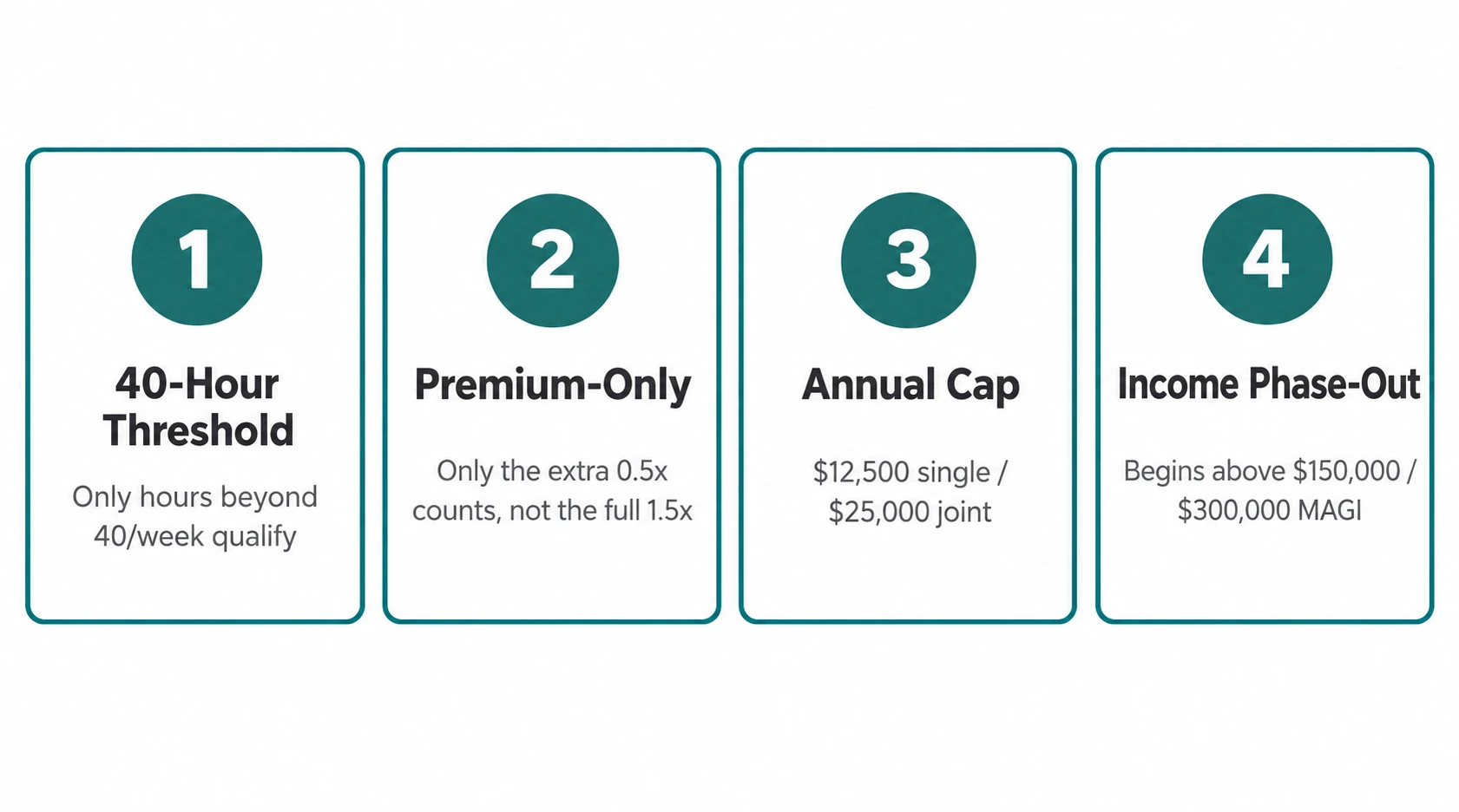
The 4 Rules of the “No Tax on Overtime” Deduction
Rule 1 — The 40-Hour Threshold
Only overtime hours worked beyond 40 hours in a single workweek qualify. Holiday pay, bonuses, and shift differentials do not automatically qualify as overtime.
Rule 2 — The Premium-Only Rule
Only the extra half qualifies for the deduction — not the full overtime dollar amount. When you work overtime at 1.5x your rate, your regular base pay for those hours is still fully taxable. Only the 0.5x “premium” portion qualifies.
Example: You earn $20/hr. You work 5 overtime hours. Your OT rate is $30/hr. Your gross OT pay is $150. Only the $50 “premium” (the extra $10/hr × 5 hours above base pay) counts as qualified overtime.
Rule 3 — The Annual Cap
- Single filers: $12,500/year maximum deduction
- Married Filing Jointly: $25,000/year maximum deduction
Rule 4 — The Income Phase-Out
The deduction phases out for higher earners: it begins reducing once Modified Adjusted Gross Income (MAGI) exceeds $150,000 (single filers) or $300,000 (Married Filing Jointly). High earners may see little or no benefit from this deduction.
What This Deduction Does NOT Do
This is where most confusion lives. The “No Tax on Overtime” deduction:
- Does not eliminate taxes on all overtime
- Does not apply to FICA taxes (Social Security and Medicare still apply to every overtime dollar)
- Does not apply to state income tax (state taxes on overtime are unchanged)
- Is not a payroll withholding change — your employer does not withhold less federal tax from your overtime pay because of this rule
- Is a federal income tax deduction only, claimed on your tax return (Schedule 1-A, an above-the-line deduction), not something applied automatically at the payroll level
Where to Find It
You will generally not see this deduction itself broken out as its own line on your individual pay stubs — it isn’t a payroll calculation, it’s something you claim when you file. Some employers have started separately labeling “qualified overtime” pay on pay stubs or year-end statements to make it easier for employees to find, but this isn’t required and varies by employer.
On your W-2, the amount of your qualified overtime compensation is reported in Box 12, Code TT — this box is new on the official W-2 starting with tax year 2026 wages (the form you’ll file in 2027). For tax year 2025 (the W-2 you likely already filed from), the IRS granted employers transition relief, so many 2025 W-2s reported this amount informally — in Box 14, on a separate statement, or using a reasonable estimate — rather than in a dedicated Box 12 code. Either way, the Box 12/14 figure reports your qualified overtime compensation, not your final deduction amount — you still calculate the actual deduction (subject to the cap and the MAGI phase-out) on Schedule 1-A when you file.
Note: This is a temporary provision (2025–2028) under the One Big Beautiful Bill Act. Additional IRS guidance may still be issued. Verify current rules at irs.gov before making financial decisions.
Real Walkthrough: $2,480.77 Gross to $1,654.47 Net
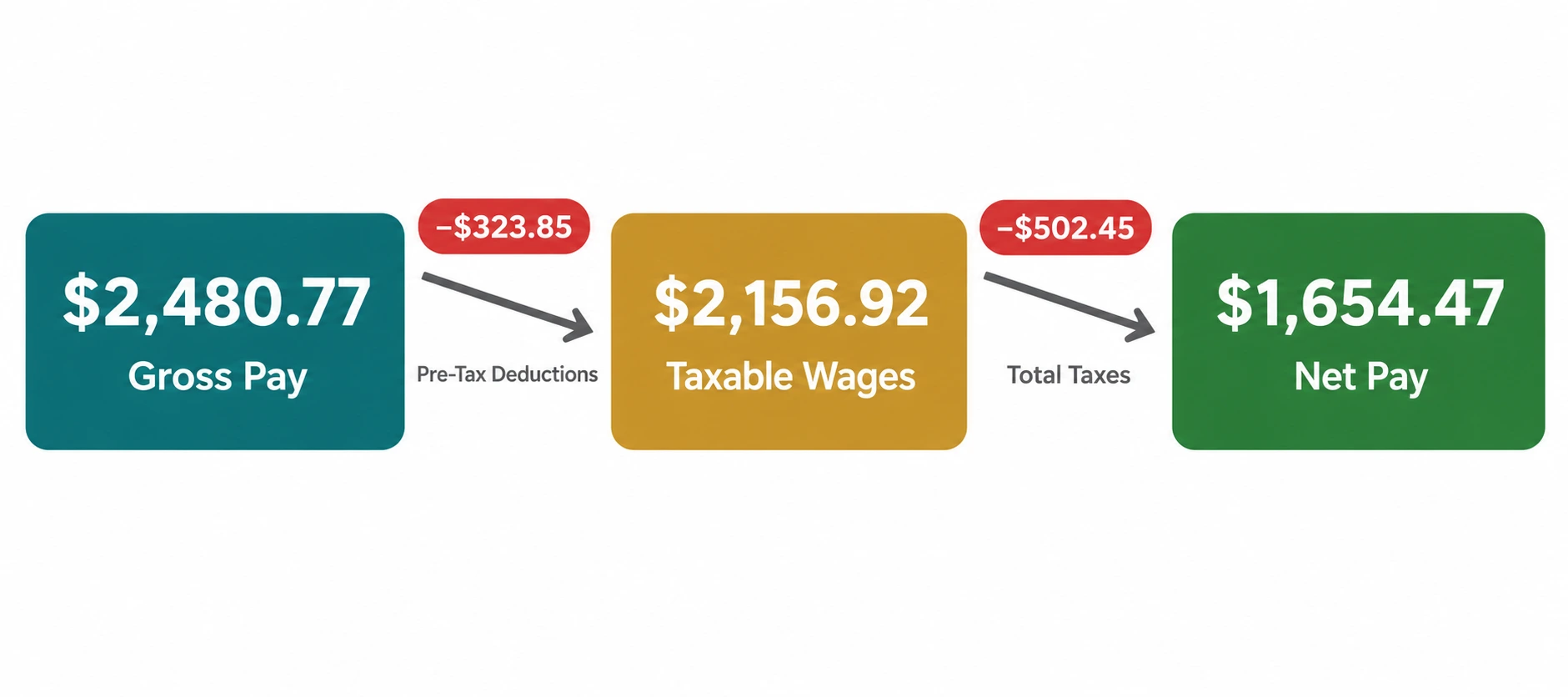
Let’s follow Jane Smith’s bi-weekly pay stub from gross to net — dollar by dollar.
Jane’s profile:
- Annual salary: $64,500
- Pay frequency: Bi-weekly (26 periods/year)
- State: Illinois (has state income tax)
- Benefits: health insurance, 401(k) contributions, dental
Jane’s Pay Stub Breakdown
| Line Item | Code | Amount | Type |
|---|---|---|---|
| Regular Pay (80 hrs) | REG | $2,480.77 | Gross Earnings |
| Gross Pay | $2,480.77 | ||
| — | — | — | — |
| 401(k) Contribution | 401K | –$148.85 | Pre-Tax Deduction |
| Health Insurance Premium | MED | –$142.50 | Pre-Tax Deduction |
| Dental Premium | DEN | –$32.50 | Pre-Tax Deduction |
| Taxable Wages | $2,156.92 | After Pre-Tax Deductions | |
| — | — | — | — |
| Federal Income Tax | FIT | –$215.69 | Tax |
| Social Security | SS | –$153.81 | Tax (6.2%) |
| Medicare | MED | –$35.97 | Tax (1.45%) |
| Illinois State Tax | SIT | –$96.98 | Tax |
| Total Taxes | –$502.45 | ||
| — | — | — | — |
| Net Pay | $1,654.47 | Take-Home |
Where Did $826.30 Go?
- Pre-tax deductions: $323.85 (retirement + benefits — much of this actually reduces her tax bill)
- Federal income tax: $215.69
- FICA (SS + Medicare): $189.78
- State income tax: $96.98
Jane’s $323.85 in pre-tax deductions reduced her taxable income by $323.85 — saving her roughly $71 in federal income tax alone at her effective bracket. Her 401(k) is also building retirement wealth, and her employer is matching a portion of that.
The $826.30 “missing” from her salary isn’t lost. A significant portion of it is working for her in tax-advantaged accounts and benefit programs.
How to Spot Pay Stub Errors
Payroll errors are more common than most employees realize. Here are the most frequent mistakes and how to catch them.
Common Pay Stub Errors
| Error Type | What to Check | How to Fix |
|---|---|---|
| Wrong personal info | Name, address, masked SSN at top of stub | Contact HR with ID documentation |
| Incorrect hours | Hours on stub vs your own timesheet records | Report to payroll with time records |
| Missing overtime | Worked >40 hrs/week but no OT line | FLSA violation for non-exempt — report to HR |
| Wrong withholding | FIT seems too high or too low | Use IRS Withholding Estimator; update W-4 |
| Missing deductions | 401(k) or benefits not deducted after enrollment | Contact benefits/HR with enrollment confirmation |
| Duplicate deductions | Same deduction appears twice under different codes | Request corrected pay stub immediately |
| Pre/post tax misclassification | Pre-tax benefit coded as post-tax | Requires corrected stub and possibly amended W-2 |
| YTD accumulation errors | YTD doesn’t match sum of past stubs | Request a full year payroll audit |
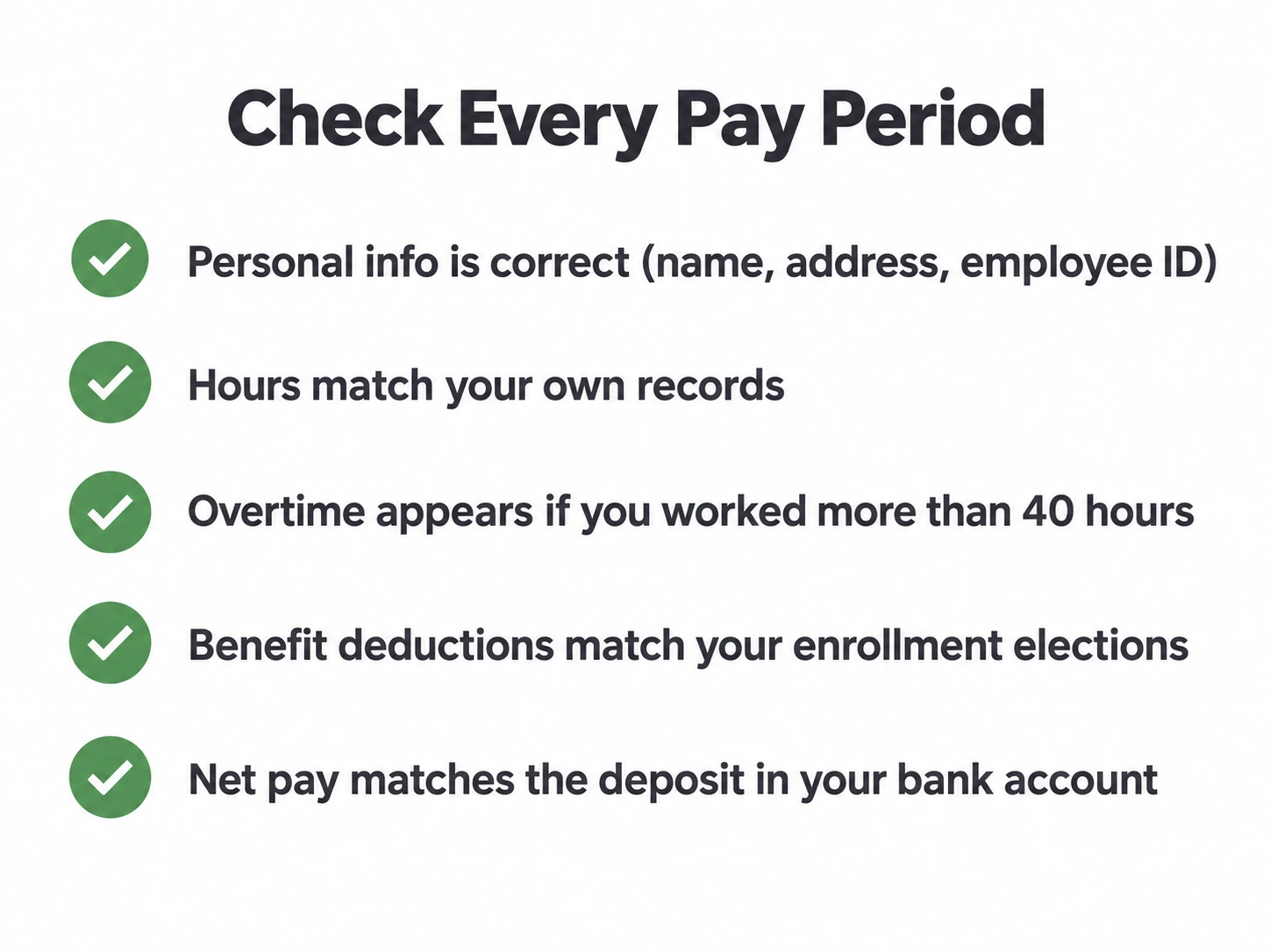
Your Every-Pay-Period Checklist
Run through these after every paycheck:
- Personal info at the top is correct (name, address, employee ID)
- Pay period dates are accurate
- Hours match your own records (hourly workers)
- Overtime appears if you worked more than 40 hours in any single workweek
- All benefit deductions match your enrollment elections
- No unexpected new deduction codes have appeared
- Net pay matches the deposit in your bank account
- Direct deposit account number (masked) is correct
Year-End W-2 Reconciliation Checklist
Before filing your taxes:
- Pull your final December pay stub
- Compare YTD Gross (minus pre-tax deductions) to W-2 Box 1
- Compare YTD FIT withheld to W-2 Box 2
- Compare YTD SS and Medicare withheld to W-2 Boxes 4 and 6
- Verify any new W-2 boxes (including Box 12 Code TT for qualified overtime)
- If any numbers don’t match, contact payroll before filing
The Error Escalation Path
If you identify an error, follow this path in order:
Step 1 — HR / Payroll: Document the issue in writing (email creates a record). Most errors are resolved here.
Step 2 — State Department of Labor: If your employer is unresponsive or disputes a legitimate error, file a wage claim with your state’s DOL.
Step 3 — Federal DOL Wage and Hour Division: For FLSA violations (missing overtime, minimum wage), the federal Wage and Hour Division at dol.gov/agencies/whd investigates and can recover back pay.
Step 4 — Employment attorney: For complex or unresolved disputes, consult an employment attorney. Many offer free initial consultations.
A Note on Wage Garnishments
If a code like GARN, LEVY, or CHILD SUPPORT suddenly appears on your stub, it means a court or government agency has ordered your employer to withhold funds from your wages to pay a debt.
Common reasons: unpaid taxes (IRS or state), student loans in default, child support orders, civil court judgments.
Federal law caps most garnishments at 25% of disposable income (or the amount by which weekly pay exceeds 30x the federal minimum wage, whichever is less). Child support garnishments can go higher under state rules.
If a garnishment appears that you weren’t expecting, contact the agency named in the order — and consider speaking with an attorney.
Financial Optimization Tips
Your pay stub isn’t just a receipt. It’s a tool. These moves can meaningfully increase your financial position.
Always capture the full 401(k) employer match. If your employer matches 50% of contributions up to 6% of salary, and you contribute less than 6% — you are leaving free money on the table. On a $60,000 salary, that’s $1,800/year in free retirement money if you hit the threshold.
Max your HSA before your FSA. The HSA triple tax advantage (pre-tax in, tax-free growth, tax-free out for medical) makes it the most powerful savings vehicle available to most workers. If you’re enrolled in an HDHP, contribute as much as you reasonably can.
Use the IRS Withholding Estimator once a year. Run irs.gov/W4App in late summer or after any major life change. Calibrate your W-4 so your withholding is close to your actual liability. Avoid giving the IRS an interest-free loan.
Save your pay stubs for at least 7 years. Federal tax law allows the IRS to audit returns up to 3 years back. Fraudulent returns can be audited indefinitely. Seven years covers most legal, tax, and loan documentation needs. Store digital copies securely.
Watch for the SS cap bonus. When your YTD earnings cross $184,500, Social Security withholding stops. Your net pay increases slightly. If you earn at this level, build this “raise” into your year-end financial planning — and remember it resets January 1.
Frequently Asked Questions
Why is my paycheck so much less than my salary?
Your gross salary is reduced by federal income tax, FICA taxes (Social Security at 6.2% and Medicare at 1.45%), and any benefit deductions you elected (health insurance, 401(k), etc.). A $50,000 salary typically yields $35,000–$38,000 in annual take-home pay depending on your state, filing status, and benefit elections.
What does FICA mean on a pay stub?
FICA stands for the Federal Insurance Contributions Act. It covers two mandatory taxes: Social Security (6.2% of gross wages up to $184,500 in 2026) and Medicare (1.45% of all gross wages). Your employer pays an equal match — separately, not shown on your stub.
What is YTD on a pay stub?
YTD (Year-to-Date) is the running total of your earnings, deductions, and taxes from January 1 through your most recent paycheck. It’s used to track contribution limits (like your 401(k)), monitor when Social Security withholding will stop, and verify your W-2 at tax time.
Is overtime taxed at a higher rate?
No — overtime is not taxed at a special higher rate. The same progressive tax brackets apply. However, because overtime increases your income in that pay period, a larger portion may fall into a higher bracket that week. If your employer uses a flat supplemental rate for bonus/overtime, that can also look higher on the stub but will reconcile at tax time.
What is the “No Tax on Overtime” (OBBBA) deduction?
It’s a federal income tax deduction for the “premium” portion of overtime pay (the extra half above base rate) earned beyond 40 hours per workweek. In effect since tax year 2025 and running through 2028, it’s capped at $12,500 per year ($25,000 for Married Filing Jointly) and phases out above $150,000 MAGI ($300,000 MFJ). It does not apply to FICA or state income taxes, and it isn’t a payroll withholding change — you claim it on your tax return (Schedule 1-A). Your qualified overtime compensation is reported on your W-2 in Box 12, Code TT (new starting with 2026 wages); it generally does not appear as its own line on individual pay stubs, though some employers label it separately.
Why did my Social Security deduction stop?
Social Security has an annual wage cap — $184,500 in 2026. Once your year-to-date earnings cross that amount, the 6.2% withholding stops for the rest of the year. Your net pay will increase slightly. This is expected behavior, not an error.
What does GARN mean on my pay stub?
GARN stands for wage garnishment — a court or government order requiring your employer to withhold money from your paycheck to pay a debt. Common reasons include unpaid taxes, student loan default, child support orders, or civil judgments. Federal law caps most garnishments at 25% of your disposable income.
How do I fix an error on my pay stub?
Document the issue in writing and contact your HR or payroll department with supporting evidence (your own time records, benefit enrollment confirmations, etc.). Most errors are corrected on the next pay cycle. If your employer does not correct a legitimate error, escalate to your state Department of Labor or the federal Wage and Hour Division at dol.gov/agencies/whd.
Conclusion
Your pay stub is one of the most information-dense documents you’ll receive in your working life — and for most people, it arrives with no instructions.
The goal of this guide was to change that. You now know what every section means, what every code stands for, how pre-tax deductions reduce your tax bill, why FICA exists, how your W-4 controls your federal withholding, and what the OBBBA “No Tax on Overtime” deduction actually does (and doesn’t do).
More importantly, you have tools to protect yourself. Run through the every-pay-period checklist to catch errors early. Use your YTD column to track contribution limits and prepare for tax season. Know the escalation path if your employer gets something wrong.
Your paycheck is your primary financial asset. Understanding it — every line of it — puts you in control.
If this guide helped, bookmark it for future reference and share it with anyone getting their first US paycheck. The abbreviation cheat sheet alone is worth saving.
Have a pay stub question not covered here? Drop it in the comments below.
This guide is one piece of our complete First Job Money Guide — covering everything from your first paycheck withholding to picking employee benefits.
If today’s numbers don’t match what you expected, the fix usually starts with your W-4 form — a quick walkthrough of how to adjust it.